
Gugugaga AI Video Generator

Make your own Gugu Gaga Penguin meme from a reference image and a creative prompt. Choose a Seedance model, direct the action, outfit, camera, and sound, then generate a vertical AI video ready to share.

Free Gugugaga AI promptsReference image controlVertical video with sound

Upload up to 9 images to preserve characters, products, or visual style.

Reference 1
719 / 4000

Generate synchronized audio with the video

Preview video - Generate your own video above

Gugugaga AI Video Examples and Prompts

Watch three real videos made in MagicCreator, then open the exact Gugugaga AI prompt behind each scene. Keep the original penguin look or remix the outfit, body shape, props, background, and joke.

Reference image

Used to guide the generated video

Original Outfit

Pancake Air Traffic Control

The serious little penguin launches a pancake, tracks it across the frame, and discovers that breakfast makes a surprisingly good hat.

Seedance 2.0 Mini6 seconds9:16Audio on

Reference image

Used to guide the generated video

Outfit Remix

The World’s Smallest CEO

A navy-suited Penguinistrator faces a tiny press conference and delivers world-changing news using only three confident Gugu Gaga sounds.

Seedance 2.0 Mini6 seconds9:16Audio on

Reference image

Used to guide the generated video

Body and Scene Remix

Fish UFO Emergency

A rounder space-rescue penguin saves a plush fish from a tiny UFO beam, gets lifted a few inches, and lands with her dignity mostly intact.

Seedance 2.0 Mini6 seconds9:16Audio on

How to Make a Gugugaga AI Video

Turn one character image and one Gugugaga AI prompt into a short meme video in three straightforward steps.

01

Upload a Reference Image

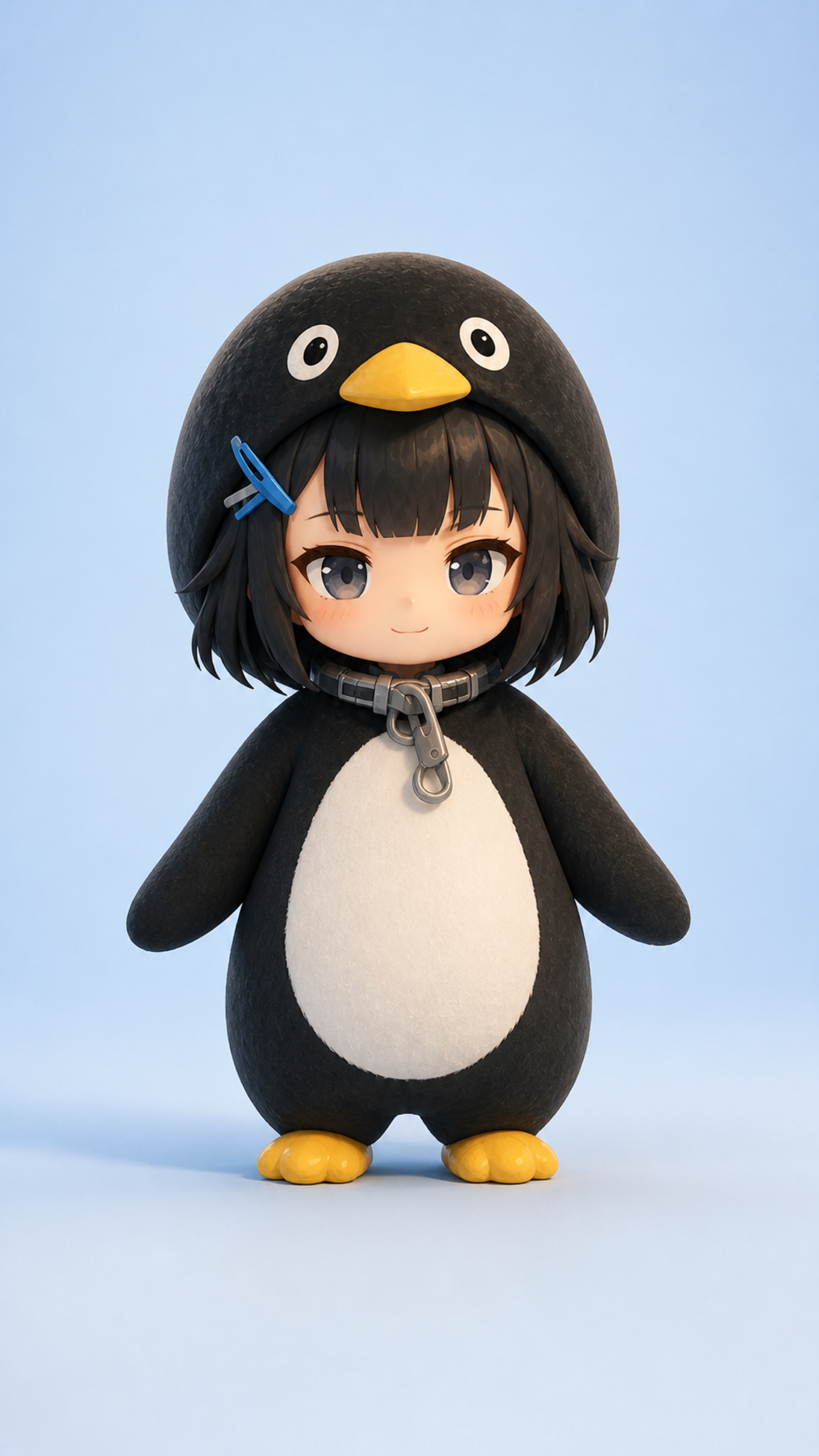
Use a clear Gugu Gaga Penguin image with the face, hood, belly, and feet visible. Choose Frame to Video to animate the exact starting shot or Reference Images to change the outfit and scene.

02

Choose a Model and Prompt

Pick any available Seedance model, set a vertical 9:16 format, and paste one of the free prompts above or write your own action, camera, background, and sound direction.

03

Generate, Review, and Download

Generate the clip, check that the penguin stays recognizable, then download the result. If a prop or expression drifts, simplify that instruction and try another version.

What Is a Gugugaga AI Video?

What Is a Gugugaga AI Video?

Gugugaga AI video combines a recognizable chibi penguin character, a tiny everyday or absurd action, and playful Gugu Gaga audio. The format is short, visual, and easy to remix into a new meme.

  • The Gugu Gaga Penguin Character
    Also known by fans as Endmin or Penguinistrator, the character is a fan-made chibi penguin interpretation associated with the Endministrator from Arknights: Endfield.
  • Cute Character, Unexpected Situation
    The joke comes from contrast: a very small, serious-looking penguin handles breakfast, office work, space rescue, or another oversized problem with baby-like confidence.
  • The Gugugaga AI Prompt
    A good prompt protects the face and signature hood while directing one clear action, a readable reaction, simple camera movement, a distinct background, and intentional sound.

Why Use This Gugugaga AI Video Generator?

MagicCreator combines reference-image control, visible model choice, prompt editing, sound, and downloadable video in one browser workflow.

Reference Image Control

Anchor the face, penguin hood, hair clip, body shape, and colors with an image instead of asking the model to invent the character from scratch.

Editable Gugugaga AI Prompts

Start from a tested free prompt, then change the outfit, prop, joke, background, camera, or audio without giving up creative control.

Multiple Generation Modes

Use Frame to Video when the uploaded image should remain the opening shot, or Reference Images when the scene and clothing need more freedom.

Prompted Sound and Voice

Describe dialogue, ambient sound, effects, and music so the clip feels intentional instead of receiving random audio from the video model.

Vertical Meme Video

Generate 9:16 Gugugaga AI videos suited to TikTok, Reels, Shorts, X, Discord, and mobile group chats.

Download the Finished MP4

Preview the completed result in MagicCreator and download the MP4 for posting, editing, or combining into a longer penguin story.

Choose a Seedance Model for Gugugaga Videos

Model choice stays visible in the generator. Pick the balance of duration, resolution, speed, and credits that fits the version you want to make.

Seedance 2.5

Choose Seedance 2.5 for longer scenes, more reference inputs, and native audio when a Gugugaga idea needs room beyond a quick reaction clip.

Seedance 2.0 Standard

Use the standard model for multimodal control and resolution options up to 4K when visual detail matters more than the lowest generation cost.

Seedance 2.0 Fast

Choose Fast when testing several Gugugaga AI prompt ideas and you want quicker iterations before committing to a final version.

Seedance 2.0 Mini

Choose Mini for affordable short meme experiments. The three real examples on this page were generated with this model.

Free Gugugaga AI Prompt Tips That Work

The most reliable prompts are specific without turning a six-second joke into a complicated movie. Use these principles when writing your own.

Lock the Character First

Repeat the face, hood, hair, clip, belly, flippers, and feet that must stay recognizable. State exactly which outfit or body detail may change.

Build One Clear Comedy Beat

Give the penguin one prop, one main action, and one final reaction. Time-coded beats help the setup and punchline fit inside a short AI video.

Direct Camera and Audio

Name the shot, camera movement, lighting, dialogue, sound effects, and music. Add no subtitles, no watermark, and no audience laughter when they are unwanted.

Ways to Use a Gugu Gaga Penguin Video

A short Gugugaga video can be a reaction, a fan-made scene, a character remix, or the first episode in a recurring social series.

Reaction Memes

Turn surprise, frustration, confidence, or confusion into a compact penguin reaction for replies, chats, forums, and comment sections.

TikTok, Reels, and Shorts

Create a vertical setup and punchline that works as a standalone post or as a recurring Gugu Gaga Penguin series.

Fan-Made Character Stories

Place the Penguinistrator in a kitchen, office, garden, game, or tiny adventure while keeping the character’s signature look recognizable.

Outfit and Scene Remixes

Use a character reference to explore uniforms, costumes, rounder silhouettes, new props, and contrasting background colors across multiple clips.

Gugugaga AI Video Generator FAQ

Answers about Gugu Gaga Penguin videos, free prompts, reference images, Seedance models, sound, downloads, and fan-made content.

1

What is a Gugugaga AI Video Generator?

It is an online tool for turning a text prompt and optional reference image into a short Gugu Gaga Penguin-style AI video. MagicCreator lets you choose the model, generation mode, duration, format, resolution, and audio settings directly.

2

How do I make a Gugugaga AI video?

Upload a clear penguin reference, choose Frame to Video or Reference Images, select a Seedance model, paste a Gugugaga AI prompt, set 9:16 for vertical content, and generate. Review the result and simplify the prompt if the character or prop drifts.

3

Can I use the Gugugaga AI prompts on this page for free?

Yes. Open any example with the View prompt button and copy or adapt the prompt for your own creation. Video generation itself uses MagicCreator credits based on the selected model and settings.

4

What should a good Gugugaga AI prompt include?

Describe the character details that must remain unchanged, one main action, the final reaction, scene color, camera framing, lighting, dialogue, sound effects, music, and negative constraints such as no subtitles or extra limbs.

5

What reference image works best?

Use a sharp image with a clearly visible face, hood, body, and feet. A centered full-body image on a simple background gives the model a strong identity anchor and leaves room for motion.

6

Which Seedance model should I choose?

Seedance 2.0 Mini is a practical starting point for short tests, Fast helps with prompt iteration, Standard offers broader resolution choices, and Seedance 2.5 supports longer scenes and more reference inputs.

7

Can a Gugugaga AI video include sound?

Yes, when the selected model and settings support audio. Prompt the dialogue, ambience, effects, and music you want. For a clean meme clip, explicitly reject subtitles, random crowd noise, and audience laughter.

8

Are Gugugaga and Gugu Gaga Penguin the same meme?

They are common spellings for the same fan-made penguin meme format. People may also use Endmin Penguin or Penguinistrator when referring to the character.

9

Is this official Arknights: Endfield content?

No. This is independent fan-made content and is not affiliated with, endorsed by, or sponsored by Hypergryph or Arknights: Endfield. Treat generated results as fan creations.

Create Your Own Gugugaga AI Video

Start with a character reference and one free prompt, then turn a tiny penguin idea into a downloadable vertical meme video.