
GPT Image 2.5 Flare is the faster choice for everyday creation and iteration. GPT Image 2.5 Sunburst is the quality-first choice for demanding images and edits where small details matter. Both models generate and edit images, accept text and image inputs, support transparent backgrounds, and share the same published token rates. The real tradeoff is speed versus the extra precision Sunburst can provide.
For most personal projects, start with Flare. Move to Sunburst when a product must remain recognizable, a local edit keeps changing the rest of the scene, a dense layout needs another level of control, or the final image matters more than waiting longer.
Editorial artwork illustrating the choice between fast iteration and precision editing. It is not a Sunburst or Flare benchmark.
Sunburst vs Flare at a glance
| Decision point | GPT Image 2.5 Flare | GPT Image 2.5 Sunburst |
|---|---|---|
| Official position | Small model optimized for speed | Base model optimized for quality |
| Best starting point | Everyday generation, quick drafts, social graphics, and repeated exploration | Detailed creative work, polished product imagery, and precision-focused editing |
| Speed | Fastest GPT Image 2.5 option | Longer generation time |
| Quality | OpenAI describes it as comparable to GPT Image 2 in the prompting guide, while the launch post claims higher quality at lower latency | OpenAI describes it as higher quality than GPT Image 2 and its most capable image model |
| Editing | Improved precise editing and subject preservation | Tighter control when editing precision matters most |
| Inputs and output | Text and image inputs; image output | Text and image inputs; image output |
| Quality controls | Auto, low, medium, high, xhigh, and max | Auto, low, medium, high, xhigh, and max |
| Common sizes | Square, portrait, landscape, 2K, and 4K options, plus custom sizes within documented limits | The same |
| Transparent background | Supported | Supported |
| Published token rates | Same listed rates as Sunburst | Same listed rates as Flare |
| MagicCreator access | Available and selected by default on the GPT Image 2.5 page | Available as a separate, directly selectable model |
OpenAI released both API models on September 8, 2026. The company's launch announcement describes Flare as the default for most applications and Sunburst as the premium option for workflows that benefit from tighter control. Its more detailed image prompting guide gives the simplest technical distinction: Flare is the small, speed-optimized model; Sunburst is the base, quality-optimized model.
Choose Flare when speed keeps the project moving
Flare makes the most sense when you expect to create several versions before choosing one. A birthday invitation, travel collage, marketplace listing, social post, or thumbnail often improves through quick changes to framing, color, and copy. Faster responses make that loop less frustrating.
OpenAI says Flare delivers 50% lower latency than GPT Image 2 in its launch announcement. The same announcement calls its output higher quality than GPT Image 2, while the prompting guide uses the more conservative phrase “comparable” image quality. Those descriptions are not identical, so the useful conclusion is narrower: Flare is designed to preserve strong everyday quality while cutting waiting time. The exact gain will vary with prompt, input images, dimensions, and quality setting.
Flare is the better first choice when:
- you want to explore several visual directions quickly;
- the image will be small or short-lived, such as a social card or marketplace thumbnail;
- GPT Image 2 already produced acceptable quality for the same task;
- you need many acceptable images rather than one painstaking final image;
- you are making broad edits and do not need every untouched detail to remain exact.
Faster does not mean careless. Flare receives the broader Images 2.5 improvements in natural lighting, texture, reference-subject preservation, and focused editing. It is the sensible default because many everyday images will not benefit enough from Sunburst's extra precision to justify a longer wait.
Choose Sunburst when the final details decide success
Sunburst is for cases where a visually attractive near-miss is still a miss. Think of a product hero image where bottle geometry must stay stable, an event flyer with several pieces of visible copy, a room edit where only one chair should change, or a character that needs to survive several rounds of revision.
OpenAI calls Sunburst its most capable model for image generation and editing. The company specifically recommends it for production-ready campaign creative and polished product imagery. For an everyday creator, that translates into a practical rule: use Sunburst when repairing errors would cost more time than waiting for the stronger model.
Sunburst is the better first choice when:
- a face, pet, product, or distinctive object must remain recognizable from a reference image;
- you need to change one element while preserving the rest of the composition;
- the image contains a complex layout, multiple labels, or small visual details;
- you are building a sequence through several edits and drift has become a problem;
- the image is a final deliverable rather than an exploratory draft.
Sunburst is not guaranteed to win every prompt. OpenAI's own guide recommends testing the same prompt, references, size, and quality setting across both models. If Flare already passes your requirements, the extra wait for Sunburst may add no practical value.
What the official side-by-side example actually shows
OpenAI's prompting guide includes Flare and Sunburst outputs for the same farmers market app brief at 1024x1536 and medium quality. Both examples produce a coherent mobile interface with recognizable sections, vendor imagery, prices, location details, and navigation. The Sunburst example uses a denser hierarchy and adds more detailed merchandising cards, while the Flare example is simpler and remains clean and readable.
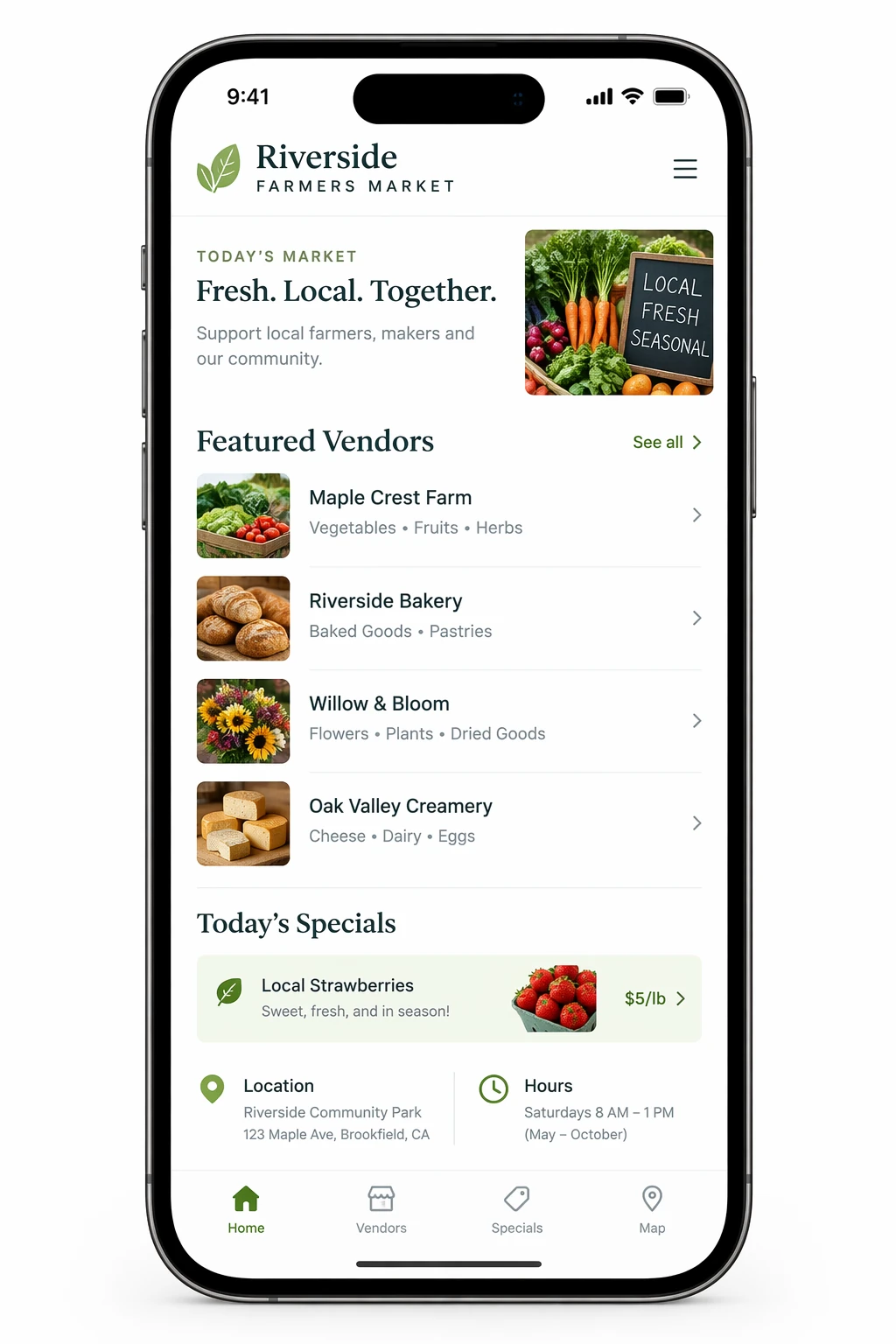
GPT Image 2.5 Flare output published in OpenAI's prompting guide.

GPT Image 2.5 Sunburst output published in OpenAI's prompting guide.
This pair is useful evidence that both variants can follow a structured interface request. It is not proof that Sunburst will always create the better layout, or that Flare will always be visibly simpler. A single selected output does not measure consistency, latency, or retry rate. Use it to see the kind of work both models can attempt, then test your own prompt before making a permanent choice.
What early community rankings add
On launch day, Arena reported that Sunburst ranked first and Flare second in its Text-to-Image, Image Edit, and Multi-Image Edit arenas. Against GPT Image 2 at medium quality, it reported gains of 40 versus 18 points for text-to-image, 59 versus 30 for single-image editing, and 81 versus 47 for multi-image editing, with Sunburst listed first in each pair.
That is an encouraging directional signal: Sunburst's larger gains are consistent with its quality-first positioning, while Flare still improved on the older model. But Arena scores are community-vote results captured at launch, not a promise about your prompt, waiting time, or finished cost. They support testing Sunburst for hard cases; they do not make Flare the wrong default.
Does Sunburst cost more than Flare?
OpenAI currently lists the same token rates for both models: $5 per million text input tokens, $8 per million image input tokens, and $30 per million image output tokens. Cached inputs have lower published rates. These are usage rates, not a fixed price per finished image.
The final cost can still differ. Resolution, quality setting, prompt and reference inputs, output token consumption, retries, and rejected results all affect what you spend for an accepted image. OpenAI also notes that its GPT Image 2 calculator does not estimate GPT Image 2.5 token consumption. Do not assume Flare is cheaper merely because it is faster, or Sunburst is more expensive merely because it takes longer.
MagicCreator makes both variants directly selectable and uses the same quality-based credit schedule for each. Flare starts at medium quality, while Sunburst starts at high, so their initial displayed credit amounts differ even though matching quality choices cost the same. The generator shows the exact credit charge before you submit.
For a personal project, compare cost per usable result:
- Run the same prompt and reference images with both models.
- Keep size and quality fixed.
- Count every attempt, including failures and retries.
- Compare total spend only after you have an image you would actually use.
If Flare reaches the same acceptance bar in fewer seconds, keep Flare. If Sunburst avoids two or three repair attempts, its precision may be the better value even at the same listed token rates.
A fair five-minute comparison workflow
The model choice becomes easier when you test a task that can expose the difference. A vague landscape prompt may make both models look good without revealing whether Sunburst's extra control matters.
Use one real asset and a precise edit request, such as:
Keep the product, camera angle, label, lighting, shadows, and background exactly as shown. Change only the cap from matte black to brushed silver. Do not add or remove any other object or text.Then review the results in this order:
| Check | What to inspect |
|---|---|
| Requested change | Did only the cap change? |
| Product preservation | Did shape, label, color, and material stay stable? |
| Scene preservation | Did framing, light, shadow, and background remain consistent? |
| Small details | Did text, edges, reflections, and fine texture survive? |
| Speed | How long did an acceptable result take, including retries? |
| Cost | What was the total cost of all attempts needed for the accepted image? |
Repeat the request at least three times per model. Choose Sunburst only if its extra precision is visible and useful for your task. Choose Flare if it clears the same bar faster.
Can you select Sunburst or Flare in ChatGPT?
OpenAI says ChatGPT Images 2.5 is rolling out to ChatGPT, ChatGPT Work, and Codex users across all tiers on desktop, mobile, and web. ChatGPT also gains Sketch, templates, image comments for targeted edits, and prompt sharing.
However, OpenAI presents Sunburst and Flare as the two API model choices. Its launch post does not describe a Sunburst-versus-Flare selector in the regular ChatGPT image interface. If you create inside ChatGPT, use the Images 2.5 experience available there; do not assume the visible product name tells you which API variant served a particular image.
MagicCreator exposes both variants as first-class choices. Open the GPT Image 2.5 generator, keep the default Flare selection for faster everyday work, or choose Sunburst directly when precision matters more. Both support text-to-image and image-to-image creation in the current interface.
Final verdict: start with Flare, earn the move to Sunburst
Choose GPT Image 2.5 Flare for fast drafts, everyday graphics, social content, thumbnails, broad exploration, and any workflow where GPT Image 2 quality was already sufficient. It is the default starting point for most people.
Choose GPT Image 2.5 Sunburst for high-stakes final images, detailed product work, complex layouts, reference preservation, and multi-step edits where unwanted changes keep ruining the result. Its value is not a vague promise of “better art”; it is the possibility of reaching a stricter acceptance bar with fewer compromises.
The smartest workflow is not to use Sunburst for everything. Start with the model that matches the risk of the task. When in doubt, try Flare first. Switch to Sunburst only when you can name the quality or editing failure you need it to solve.
Frequently asked questions
Is GPT Image 2.5 Sunburst better than Flare?
Sunburst is OpenAI's more capable, quality-optimized model, but that does not make it the best choice for every image. Flare is faster and is designed to maintain strong quality for everyday creation. Sunburst is better when its added editing precision or detail changes whether the output is usable.
Is GPT Image 2.5 Flare faster than Sunburst?
Yes. OpenAI positions Flare as its fastest high-quality everyday image model and says Sunburst takes longer. OpenAI reports Flare at 50% lower latency than GPT Image 2, but your actual time will depend on the prompt, references, dimensions, and quality setting.
Do Sunburst and Flare support image editing?
Yes. Both accept text and image inputs and produce images. Both support precise editing, subject preservation, multiple quality settings, custom sizes within documented limits, and transparent backgrounds.
Do Sunburst and Flare have the same price?
Their published token rates are the same as of September 9, 2026. That does not guarantee identical cost per image because token consumption, settings, retries, and the number of usable results can differ.
Which model should I use for product photos?
Use Flare for fast product concepts, background ideas, and listing variations. Start with Sunburst when exact product geometry, packaging text, materials, or tightly controlled edits determine whether the final image is acceptable.
Which model should I use for social media images?
Start with Flare. Social images usually benefit from quick iteration, and the final asset is often displayed at a smaller size. Use Sunburst when the post includes a detailed layout, exact visible text, or a reference subject that Flare fails to preserve.
Can I use GPT Image 2.5 Sunburst or Flare in MagicCreator?
Yes. Both models are directly selectable in MagicCreator's GPT Image 2.5 generator. Flare is the page default, while Sunburst appears as a separate model choice. The displayed credit amount updates with the selected quality setting.
Sources and update notes
Last fact check: September 9, 2026. This article uses official launch and model documentation for capabilities, settings, pricing, and availability. The visual comparison is an official example pair, not a MagicCreator test. MagicCreator availability reflects the current project implementation; no output-quality claim in this article comes from an internal generation test.
- OpenAI: Introducing ChatGPT Images 2.5 — release date, overall improvements, ChatGPT features, model positioning, latency claim, and availability.
- OpenAI image prompting guide — model-selection guidance, shared settings, test method, limitations, and official Flare/Sunburst examples.
- GPT Image 2.5 Flare model page — model identity, modalities, quality settings, model IDs, and token rates.
- GPT Image 2.5 Sunburst model page — model identity, capabilities, quality settings, model IDs, and token rates.
- Arena announcement on X — early community-vote leaderboard context; not used as a substitute for a matched MagicCreator test.