
Qwen-Image 2.1 is an open-weight image generation and editing model released by the Qwen team on September 20, 2026. The official weights are available to download now from Hugging Face and ModelScope, with the implementation published in the official GitHub repository. Its visual generator has 7 billion parameters and combines text-to-image creation, reference-based editing, native transparent RGBA output, and subject extraction in one model. It can also use as many as 10 reference images in a single editing workflow.
The release is especially interesting for creators who need reusable assets rather than a single finished rectangle. A product, sticker, character, or photographed object can move between a composed scene and a transparent layer without switching to a separate background-removal model. The tradeoff is equally important: the downloadable weights use the Qwen Research License, which limits them to non-commercial use unless Qwen grants a separate commercial license.
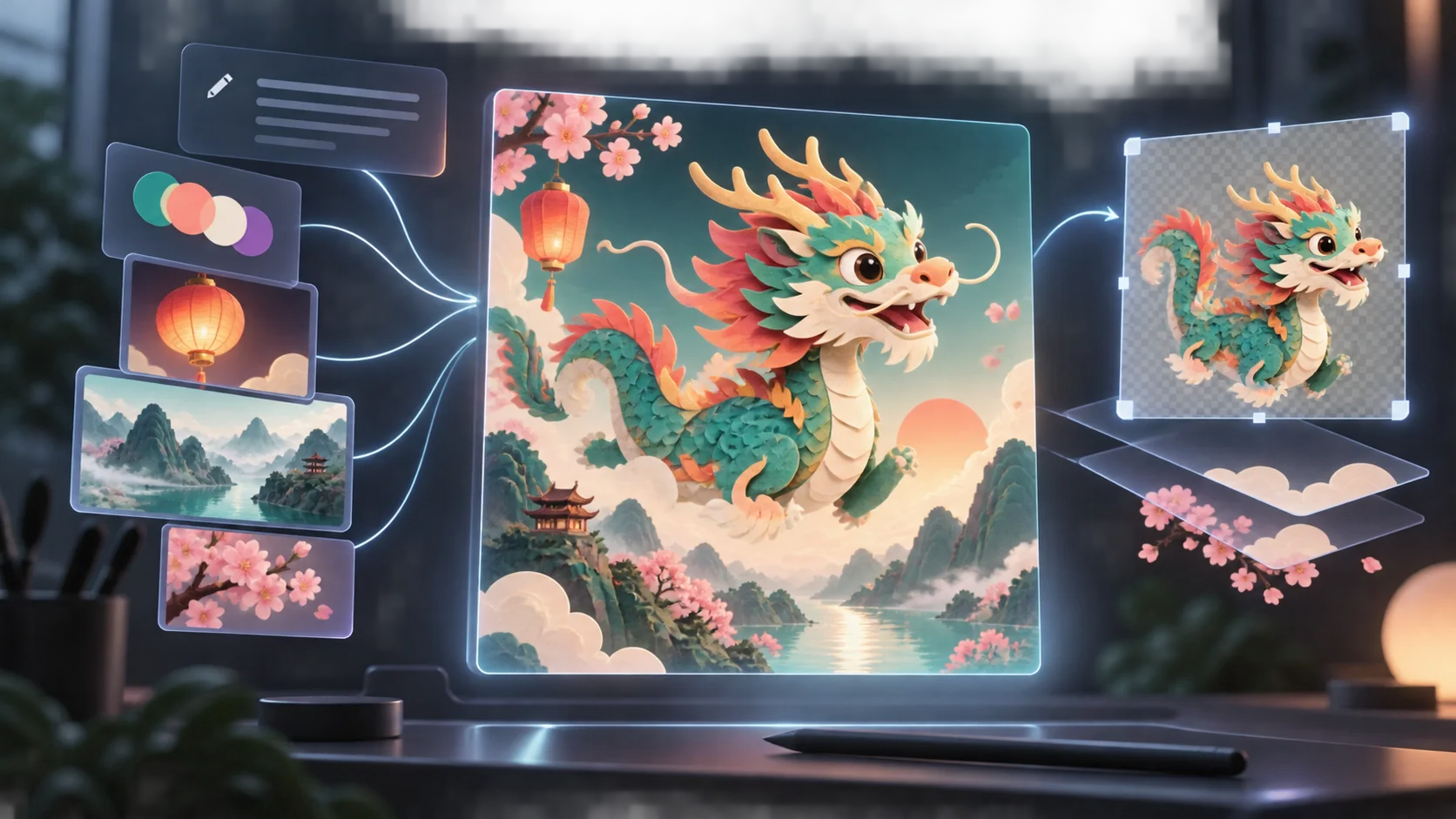
Editorial artwork illustrating the Qwen-Image 2.1 workflow. It is not a Qwen-Image 2.1 output or benchmark.
Qwen-Image 2.1 at a glance
| Question | Confirmed answer |
|---|---|
| What is it? | A unified text-to-image and image editing model from Qwen |
| Release date | September 20, 2026 |
| Are the weights available? | Yes—download them from Hugging Face or ModelScope |
| Model size | 7B parameters in the visual generation component, using 32 single-stream DiT layers |
| Inputs | A text prompt, or a prompt plus one or more condition images |
| Reference-image limit | Up to 10 references in the official model card |
| Output | Standard RGB images or transparent RGBA images |
| Editing controls | Plain-language instructions, circles, painted annotations, and separate masks |
| Recommended resolution | 2048×2048 for square images, with official presets up to 2752×1536 for 16:9 |
| License | Qwen Research License; non-commercial by default |
| Browser workflow | See the Qwen-Image 2.1 creation guide for prompts, references, and editing ideas |
The official model card provides the weights, recommended image sizes, examples, and license. Hugging Face's Qwen-Image 2.1 pipeline documentation independently confirms the combined text-to-image and image-conditioned workflow, including multiple condition images.
What changed in Qwen-Image 2.1?
Qwen describes four main improvements: a smaller and more efficient generator, native transparency, more flexible editing, and refined texture and aesthetics. The practical value comes from how those pieces work together.
Native transparency is part of the model
Qwen-Image 2.1 can generate an RGBA image directly, edit an existing transparent layer, or extract a requested subject from a regular photograph as a transparent asset. That is different from generating a picture on a white background and removing the background afterward.
For an everyday creator, this opens up several useful jobs:
- generate a sticker or mascot ready to place over another design;
- isolate a product from a photo for a marketplace listing;
- edit a transparent character while keeping its alpha channel;
- build a poster from several reusable foreground and background layers.
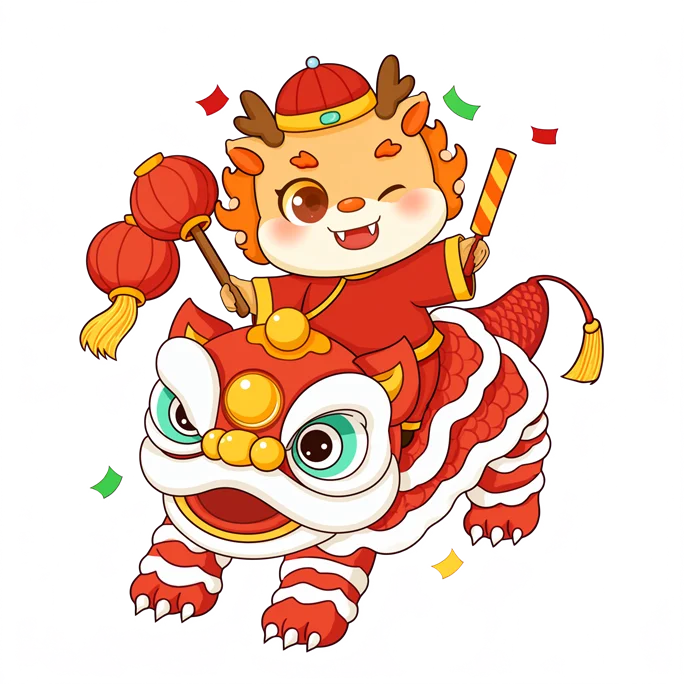
Official Qwen-Image 2.1 native-transparency example from Qwen's model card. This was not generated by MagicCreator.
One model handles creation and editing
The same Qwen-Image 2.1 workflow can begin with text alone or with an existing image. You can create a scene, pass that result back in, and request a focused change without moving between separate generation and editing models.
The model accepts local guidance in several forms. A creator can circle the object that should change, paint over an area, or supply a separate mask. This makes instructions such as “replace only the lamp,” “move the logo-free package onto the table,” or “keep the person and change the weather” more concrete than a text prompt alone.
Up to 10 reference images support compositing
Multiple references are useful when no single source image contains everything the final picture needs. One image might define a product, another the room, a third the color palette, and a fourth the pose or composition. Qwen says the model supports up to 10 references and is designed to preserve the identity of people and products while combining them.
More references are not automatically better. Give each image a distinct role in the prompt—“use image one for the product shape, image two for the room, and image three for the lighting”—and remove any source that contradicts the others.
The 7B generator targets a better size-to-quality balance
The visual generation component has 7B parameters, much smaller than the 20B Qwen-Image releases that preceded it. Qwen pairs that compact design with mixed-granularity attention and prefix KV-cache reuse. For consumers, the relevant promise is simpler: a smaller model that still aims to produce detailed, attractive images and support demanding editing tasks.
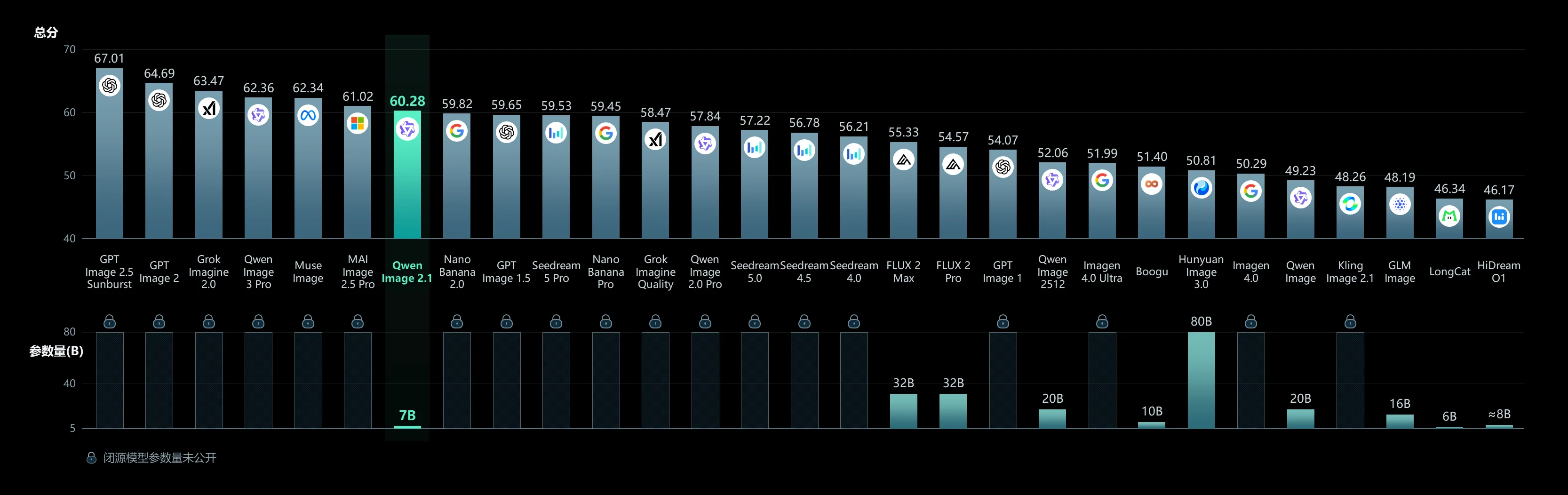
Qwen's release graphic positions Qwen-Image 2.1 as a 7B model with a strong size-to-score balance. The chart reports the vendor's own evaluation, not an independent MagicCreator test.
Why is Qwen-Image 2.1 newer than Qwen-Image 3.0?
The version numbers do not describe one simple chronological ladder. Qwen launched Qwen-Image 3.0 in July 2026 as a newer hosted image-generation model, then released Qwen-Image 2.1 in September as a compact open-weight model focused on unified generation, editing, transparency, and local control.
Qwen has not published a simple statement saying that 2.1 replaces 3.0 or that every higher number is the better choice. Treat them as different product branches with different access and workflow priorities. If you want downloadable weights, transparent layers, or detailed reference-based edits, 2.1 is the relevant release. If you are choosing a hosted model purely for final image quality, compare actual results and product access rather than the version number alone.
What can ordinary creators make with it?
The strongest use cases connect generation and editing instead of treating them as separate features.
Product scenes from several references
Provide a clean product photo, a room or landscape reference, and a lighting reference. Tell the model what to take from each image and which product details must stay unchanged. This can produce listing visuals, menu images, or a seasonal promotion without photographing every setting.
Stickers and transparent characters
Ask directly for an RGBA image with a transparent background. Describe the subject, edge treatment, pose, and whether it should look like a paper sticker, game asset, or polished 3D character. The transparent output can then be placed over a social graphic or edited again.
Focused changes with visible annotations
Circle an object or paint over the region that needs correction, then name both the desired change and the details that should remain. This is useful for changing an item, color, sign, background element, or small part of a larger composition.
Posters and text-rich graphics
Qwen says 2.1 improves typography, portrait lighting, textures, and fine detail. That makes it relevant to posters and visual guides, although readable long-form text remains a job to verify in the actual output. Keep copy short, state it exactly, and expect to inspect spelling before publishing.
How to access Qwen-Image 2.1
The weights are no longer a preview or waitlist item: Qwen-Image 2.1 is available to download now. Use the official Hugging Face model repository, the ModelScope mirror, or the Qwen GitHub repository for the implementation and current setup notes.
There are three practical routes:
- Official demo: Qwen links a browser demo from the model card. This is the quickest way to inspect the model without setting up local files.
- Download the weights: The official Hugging Face repository includes the model and a documented Diffusers workflow. The full files and supporting encoders require substantial storage and capable hardware, even though the visual generator itself is 7B.
- Use a hosted creative product: Availability, reference limits, settings, credits, and commercial terms depend on the product rather than the model card. Check the live model selector and displayed cost before starting a paid project.
The official presets center on roughly 2K output: 2048×2048 for square images, 2400×1792 for 4:3, 2528×1696 for 3:2, and 2752×1536 for 16:9. These are recommended model dimensions, not a promise that every hosted interface exposes every preset.
The license is a real limitation
Qwen-Image 2.1 is available to download, but “open-weight” does not mean unrestricted commercial use. The Qwen Research License grants use, modification, and redistribution for non-commercial research or evaluation. Commercial use of the model materials requires a separate license from Qwen.
That distinction matters if you plan to run the weights yourself, build a paid product around them, or distribute a derivative. A hosted service may operate under its own agreement, but that does not automatically grant every user the right to download and commercially deploy the weights. Check both the model license and the service's current terms for your intended use.
Is Qwen-Image 2.1 worth trying?
Yes—especially if native transparency, multiple visual references, or localized editing are central to the job. Those features distinguish the release more clearly than a generic promise of better image quality.
The best first test is a task that uses its full workflow: combine two or three references into a new scene, make one annotated edit, and extract the main subject as a transparent layer. That reveals whether the model preserves identity and follows local instructions in your kind of image. A single attractive text-to-image result will not test what makes 2.1 different.
Qwen-Image 2.1 FAQ
Is Qwen-Image 2.1 open source?
Qwen calls the model open source, and the official weights are already downloadable from Hugging Face and ModelScope. The weights use the Qwen Research License rather than Apache 2.0. The license permits non-commercial research and evaluation by default; commercial use requires a separate agreement.
Where can I download Qwen-Image 2.1 weights?
Download the official weights from Qwen on Hugging Face or Qwen on ModelScope. The accompanying implementation and updates are available in the official GitHub repository.
Can Qwen-Image 2.1 edit existing images?
Yes. It accepts an image with a text instruction and supports local guidance through circles, painted annotations, or separate masks. It can also use multiple condition images in one request.
Does Qwen-Image 2.1 generate transparent PNG images?
Yes. The official model card documents native RGBA generation, editing of transparent layers, and extraction of a subject from an RGB photograph. Whether a particular product preserves the alpha channel depends on that product's implementation and download format.
How many reference images does it support?
The official Qwen model card states support for up to 10 reference images. A hosted interface may expose a smaller limit, so check the product before preparing a large reference set.
Is Qwen-Image 2.1 better than Qwen-Image 3.0?
There is no universal answer. Qwen-Image 2.1 is notable for downloadable 7B weights, native RGBA, unified editing, and multi-reference control. Qwen-Image 3.0 is a different, newer-generation hosted branch. Choose by the task, access route, license, and tested results rather than version number alone.